


Inventory sync — One stock count, updated everywhere a sale happens
Inventory sync keeps the same stock count in every system that sells or tracks your products. When an item sells in the shop, online or on a marketplace, the other systems update to match. It suits businesses that sell the same stock in more than one place and recount by hand to catch mistakes.

By Julia Ja, Owner
Stock levels across systems
Updated 11:20 am| Item | POS | Web store | Marketplace |
|---|---|---|---|
| Blue ceramic lamp | 0 | Sold out | Sold out |
| Fig soy candle | 12 | 12 | 12 |
| Stoneware mug | 8 | 5 | 8 |
The mug counts disagree, so it goes on the mismatch list for the manager to check.
Check the mug on the shelfWhy it matters
The problem it solves
When the same stock sells in a shop, a web store and a marketplace, each system keeps its own count. Someone has to update the others by hand, usually at the end of the day or not at all.
The gap shows up as an online order for an item that sold at the counter that morning. Staff refund the customer, apologize and fix three systems, and the counts keep drifting until the next physical count.
Example · illustrative
A gift and home goods shop on a Saturday
- At 11:20 am a customer buys the last blue ceramic lamp at the counter, and the sale is rung up in the POS.
- The web store and the marketplace listing then show the lamp as sold out, so an online shopper can't add it to the cart.
- At 2 pm a delivery of twelve candles is received once in the POS, and the accounting software picks up the new count.
- One mug shows a different count online than in the POS, so it lands on the mismatch list for the manager to check.
How it works
How inventory sync works
- Starts whenAn item is sold, received, returned or adjusted in any connected system
- 1Step 1Catch the changeThe sale, delivery or count adjustment is picked up from the system where it happened.
- 2Step 2Match the itemThe item is matched across systems by SKU, part number or barcode, even when the names differ.
- 3Step 3Update the othersStock levels change in the online store, marketplace listings and accounting software. Sold-out items are hidden or marked.
- 4Step 4Flag mismatchesWhen counts disagree or an item can't be matched, it goes on a short list instead of being guessed.
- A person decidesCheck and correctStaff compare flagged items with the shelf and decide which count is right.
Before · by hand
- A sale in the shop doesn't reach the website until someone updates it.
- Customers order items online that already sold at the counter.
- Staff re-key deliveries and adjustments into two or three systems.
- Counts drift apart until the next physical count.
With inventory sync
- A sale anywhere updates the count everywhere.
- Online listings come down when the last one sells.
- Deliveries are entered once.
- Mismatches show up as a short list to check, not as a customer complaint.
What we build
The parts of inventory sync
Your systems
- Shopify
- Square
- QuickBooks Online
- NetSuite
- Amazon Seller Central
- Toast
What we build
1Change listeners
Connections to the POS, web store, marketplaces and accounting software that pick up each sale, delivery, return and count adjustment as it's recorded.
2Item matching table
One list that ties each product's SKU, barcode or part number to its listing in every system, including items named differently in each.
3Source-of-truth rules
Agreed rules for which system wins for which kind of change, such as receiving in the POS and online returns in the web store.
4Sold-out handling
What happens online when the last unit sells: hide the listing, mark it sold out, or hold a small buffer back for walk-in customers.
5Mismatch list and retry log
Items whose counts disagree or failed to update, with the last change in each system. Staff check the shelf and fix the right one.
Your team decides
- Staff decide which count is right when systems disagree.
- Physical counts still happen; the sync keeps the systems in step between them.
- The owner sets what happens when an item sells out online.
Industries it fits
What inventory sync looks like in each industry
Auto repair & tire shops
Tires and parts sold at the counter come off the online listings, including one-off used tires with their size and tread. New stock from a distributor is entered once and shows up on the website and in the shop system.
Everything for auto repair & tire shopsYour industry isn’t listed, or works differently? Describe it and get an answer in a minute.
Getting started
What you need first
We go through these with you in the audit, before anything is built.
Before we start
5 things to have ready- Admin or API access to each system that sells or holds stock: POS, web store, marketplaces and accounting.
- A unique ID for every item, or a decision on how to create one for items without SKUs or barcodes.
- A decision on which system is the source of truth for receiving, returns and counts.
- A recent physical count, so the sync starts from numbers that match the shelf.
- One person who checks the mismatch list and makes the call when counts disagree.
How a rollout runs
- 1Map items and channelsWe list every system that holds stock, match each product across them, and note the items that don't match cleanly.
- 2Set the rulesWe agree with you which system wins for each kind of change, and what happens online when an item sells out.
- 3Connect one direction firstWe start with one flow, such as POS sales updating the web store, and compare the counts with the shelf.
- 4Test the hard casesWe run returns, partial deliveries, bundles and two channels selling the last unit, and check each ends with the right count.
- 5Add the remaining channelsMarketplaces, accounting and receiving are added one at a time, each checked against a spot count.
What to measure
How to know it's working
Weekly report · inventory sync
IllustrationOversold orders
Online orders for items that were already gone. This is the problem the sync exists to stop.
Items on the mismatch list
A steady or shrinking list means matching and rules work. A growing one points to a channel or item type to fix.
Difference at physical count
How far system counts sit from the shelf at each count shows whether drift is shrinking.
Failed updates and retries
Updates that needed a retry or an alert show which connection is unreliable.
Manual stock edits
Hand edits in any system point to a process the sync doesn't cover yet.
We measure the baseline before building, so the change can be compared afterwards.
When it’s not a fit
- It can't fix counts that are wrong at the start. If the shelf and the systems already disagree, do a physical count first.
- Items without a unique ID cause the most trouble. If listings use different names with no shared code, matching takes work up front.
- Some marketplaces limit how often stock can be updated, so fast-selling items may need a buffer held back online.
- Damage, theft and breakage don't record themselves. Staff still need to log them as adjustments for counts to stay right.
Tool or custom build
Do you need a custom build?
Option A · a ready-made tool
An off-the-shelf tool may be enough
If you sell through Shopify or Square plus a marketplace or two, their built-in channel sync may cover it. Tools like Sellbrite or Linnworks are another option. They fit well when every item has a SKU and your systems are supported.
Option B · built around your systems
When a custom build is worth it
A custom build makes sense when stock lives in a system those tools don't support or items lack standard SKUs. It also fits when accounting and a B2B portal must stay in step.
Not sure which fits?
What it typically costs
Typical ranges as of October 2026. Not a quote.
Ready-made tool, set up by us
An existing platform on your own account, configured for your business.
- Setup, one timepaid to Lorryn
- $1,000–$2,000
- Tool subscriptionpaid to the provider
- $50–$200 / month
Fits when your process matches what the platform already does.
Custom build
Built around how you work, with no platform subscription. You own it.
- Build, one timebasic version to full version
- $2,000–$9,000
- Running costshosting and usage, on your accounts
- ~$5–$25 / month
Fits when your systems, rules or exceptions don't match a ready tool.
Optional Automation Care: $125 · $250 · $375 / month
1, 2 or 3 hours of support a month, with monitoring and alerts included. Without it, you run it yourself after handover.
Typically works with Shopify, Square, QuickBooks Online, NetSuite.
Booking into or writing to your field-service, practice or shop software adds up to $500 to the ready-made tool (often a built-in feature) and $500–$1,500 to a custom build.
Your price depends on volume, the systems involved and how many exceptions need a person. Our team confirms a fixed price before any work starts.
Proof and who stays in charge
From our results · Tire & auto repair shopLiveA tire and auto repair shop lists its used tires online, and the listings update on every sale.Read the case studyThe real app · used-tire intake
Three photos in, a listing out
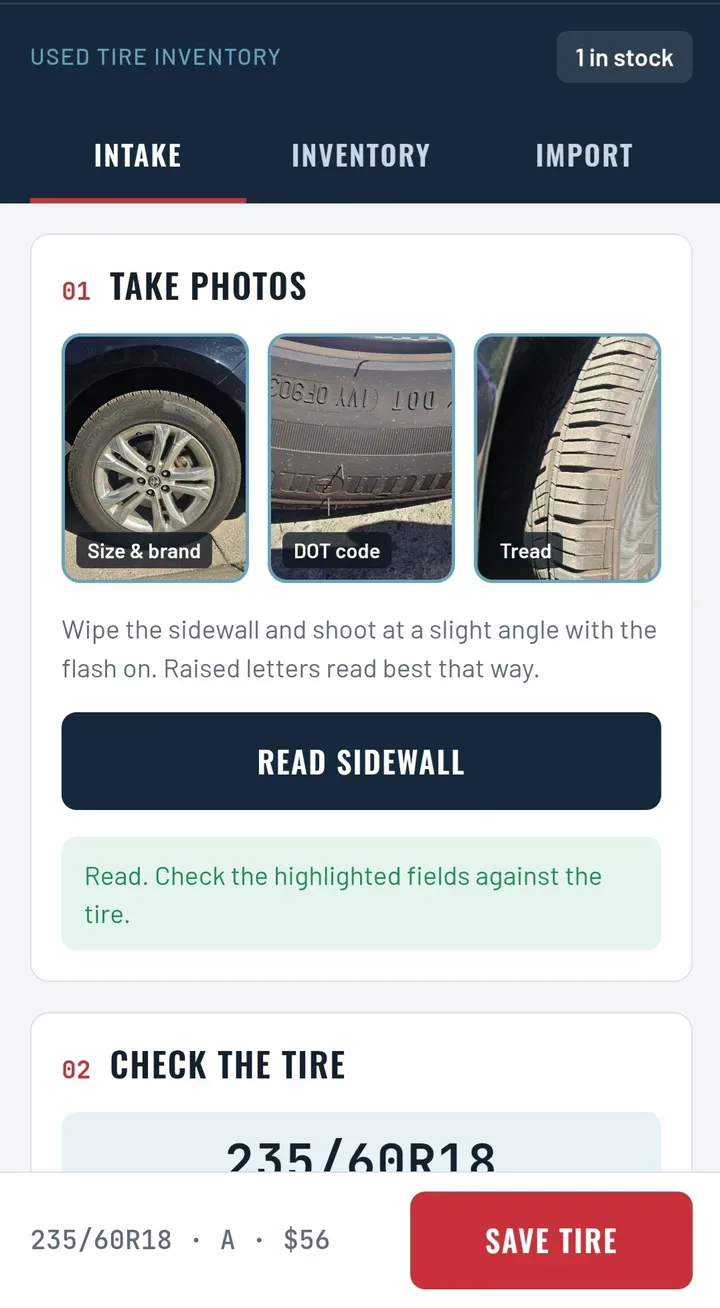
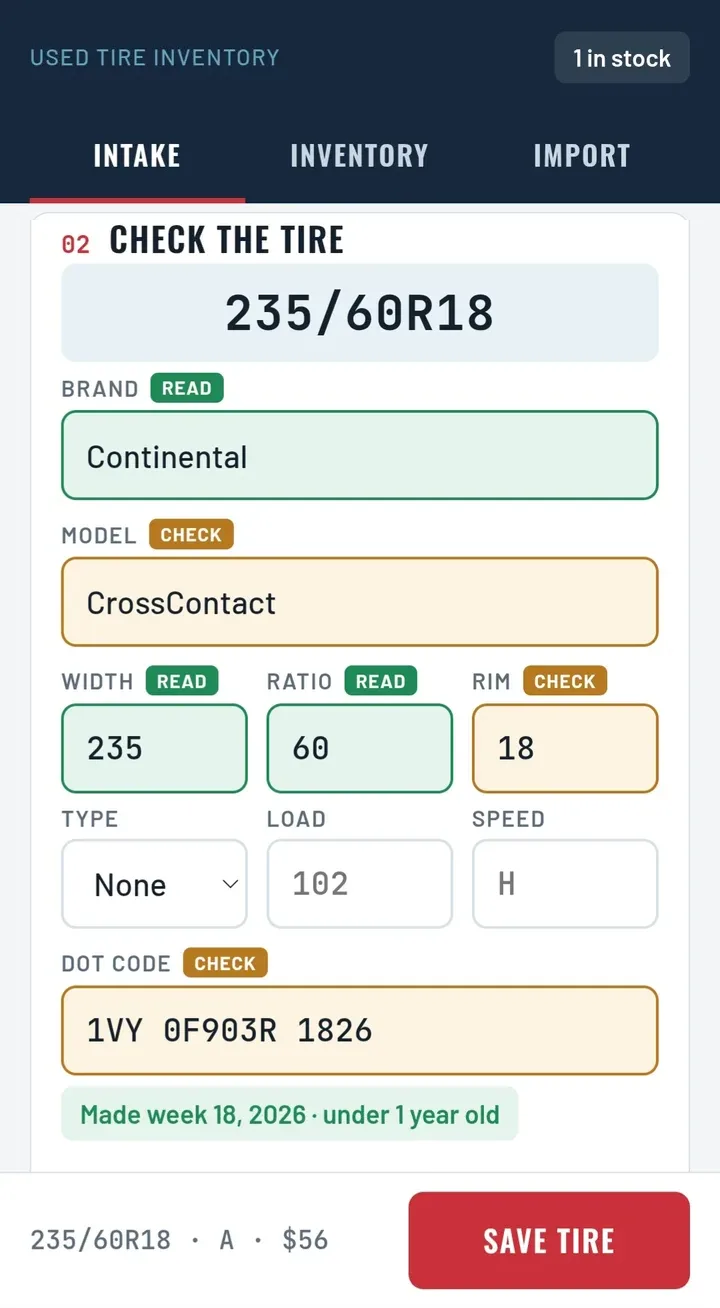
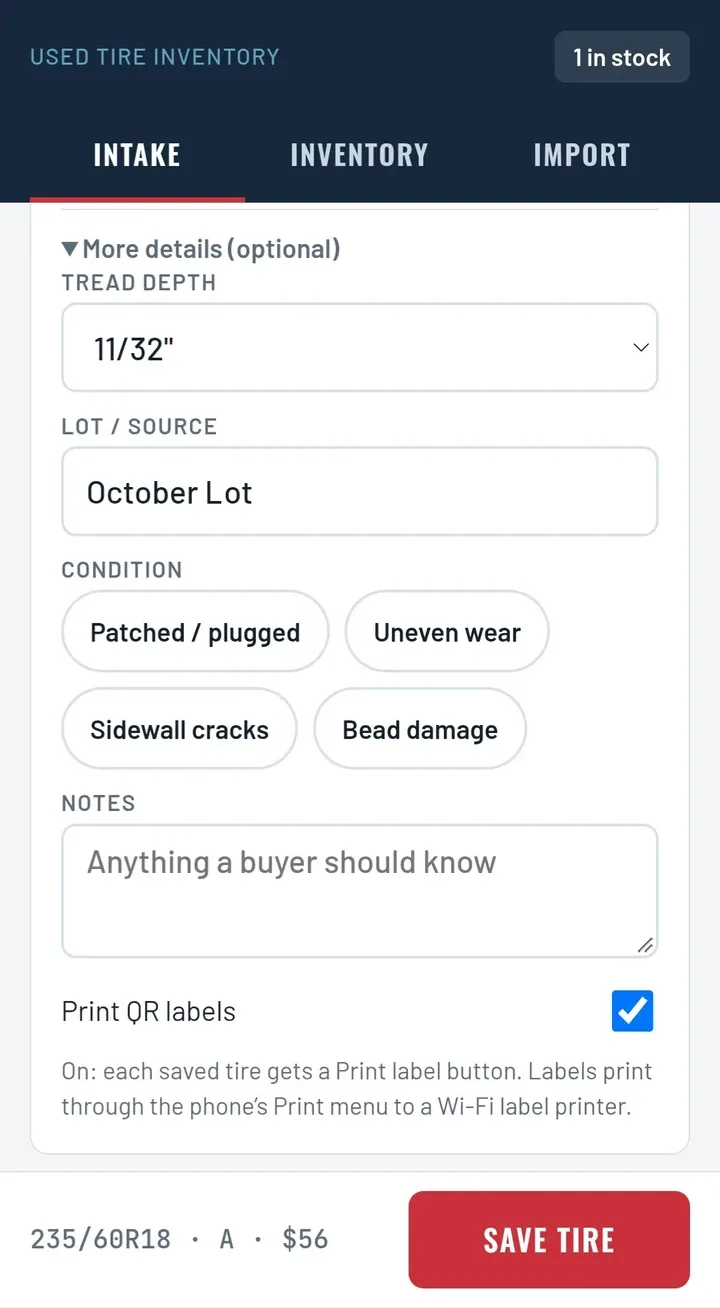
Each sidewall read costs about 2 cents in AI usage ($0.016 per tire).
See the full caseWho does what
The automation does the routine steps. A person makes the call.
- 1Catch the changeAutomated
- 2Match the itemAutomated
- 3Update the othersAutomated
- 4Flag mismatchesAutomated
- 5Check and correctA person
FAQ
Questions about inventory sync
Most POS, ecommerce and accounting systems can be connected. We check yours on a free call before we quote.
The second sale is flagged right away so staff can contact the customer or offer a substitute. Holding back a small buffer online makes this rarer.
Yes, as long as each item gets a unique ID. For one-off items like used parts, we usually create one when the item is logged.
Only if you want it to. Most setups sync stock only and leave pricing to the person who sets it.
Failed updates are logged and retried, and anything that still fails sends an alert. Nothing is skipped silently.
You decide. Often the POS is the master for in-store sales and receiving, and the web store for online returns. The rules are written down before launch.
Yes, once they're mapped. A bundle deducts each item inside it, and each size or color is tracked as its own item.
Yes. Each channel can be paused on its own, for example during a stock count, and brought up to date when it's turned back on.
Related use cases
Often built together
- Inventory & operationsMulti-supplier stock lookupSearches several suppliers' stock and prices at once, next to your own inventory.
- Data & reportingSystem syncKeeps customers, jobs and invoices in step between the systems your team already uses.
- Data & reportingData cleanup and alertsFinds duplicates, gaps and odd values in your records and alerts the person who can fix them.
Want inventory sync for your business?
Pick the step that suits you. Every path starts with how the work runs today, and we'll say honestly whether it's worth automating.
- Right now · any hour
Ask Lorryn AI
Describe your process and get a first answer in a minute: what to automate, what it connects to, and a rough estimate.
- Free · 15 or 30 minutes
Talk to our team
Bring one process to a video call. Leave knowing whether it’s worth automating and how.
- Free · 6 of 15 spots left
Get a free written plan
Free for businesses with 3 or more employees, while spots last (normally $250).
Claim a free audit9 of 15 claimed